

Making changes to Dynamics GP while prepping for a future move: Adding major modules to GP

You may be planning to stick with GP for as long as you can, maybe even past the final support date in September 2029. But what if something unexpected comes up, and you suddenly need to make a significant change to your business or financial operations?
If you plan for the unexpected, you may be able to transition sooner than you expect if a major change pushes you in that direction. The more you can get done in preparation for a future move (no matter when you plan it to happen), the more prepared you will be if you need to transition to a new ERP, like Business Central, sooner than expected.
This blog is part of a series that will discuss many of the changes that may signal actions you can take to prep for your transition to Business Central, while still adding new features to GP that you need. Anything that you can do now to prep for a transition while you are using GP will make the transition to Business Central that much easier.
In this blog, we will discuss what to do if you need to add a major module in GP.
Should I add a new module to GP now?
While you may have used GP for years, your business may change, and you may need to consider implementing features you thought you would never use. The biggest change you could make at this time would be adding Service, Project Accounting, or Manufacturing to your existing GP installation.
If you are considering implementing Project Accounting, Manufacturing, or Service Management modules in GP, you should seriously consider accelerating your timeline for your switch to Business Central. At first, you might think these functionalities are available in GP, so why wouldn’t I just start using them? However, you also want to consider all the costs associated with implementing these new GP components. Adding any of these is no small task. Each will incur significant expenses, and it is better to do this in Business Central to avoid duplicating implementation charges and training requirements across two systems instead of just one.
Let's use Project Accounting as an example since most of what needs to be redone in Business Central for Project Accounting will be similar for Service and Manufacturing.
Big Changes, Big Decisions
We still get requests from our GP clients to add Project Accounting to GP, even though they know they will transition to Dynamics Business Central as soon as they are ready. These clients know it may not be feasible due to the expense, but they also need Project Accounting and would like to get started right away.
Can we assist with this? Sure! Will we? Probably not.
It isn't in our clients’ best interest to make a major change like this in a system that will no longer be supported in a few years. Adding a module isn't the same as beginning to use standard existing GP features that are easy to implement or will yield immediate returns in time and money. The biggest difference is that whatever you add to GP will need to be added again when you transition to Business Central. Everything will be different across these applications, and since there is no migration path for Project Accounting, you will have to implement and train everything twice. For example:
Designing your project structure and project naming conventions will vary, and the setup variances between the two ERPs result in completely different project structures.
GL accounts and posting setup will be completely different because GP is based on Cost Categories, while Business Central uses posting groups; therefore, the posting flows will differ as well.
Open GP projects must be manually entered into Business Central. Transferring projects with activity will be complicated. In a fixed-price project with deferred billing and revenue accounts calculated on a percentage-of-completion basis, this is especially true. You will need to bring in partially completed projects and maintain the correct WIP calculations. Transferring partial projects is doable, but it isn't ideal.
Custom Reports built for GP Project Accounting, like WIP reconciliation reports, will need to be redone.
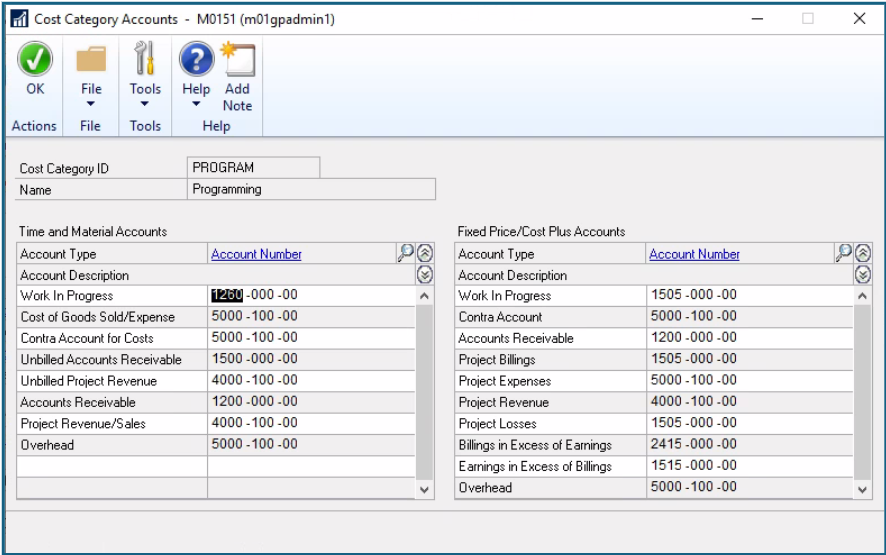
Image: Sample of GP Cost Category Setup

Image: Sample of Business Central Project Posting Groups
If you need to make a major module add to GP, you can. However, we recommend accelerating your Business Central implementation and adding the functionality you need there instead, since the costs (both in terms of money and time) of implementing Project Accounting, Manufacturing, and/or Service in GP will be incurred again in Business Central.
Whether you are expecting to make a major change within Dynamics GP, or even if you aren't planning many changes, start planning your Business Central transition now. Meet with your partner and discuss Business Central. Get demos, get a quote, and be ready to move forward if your needs change sooner than expected.