

Don't Forget to Update Your Production Order Calendars! Here’s how.
Understanding Production Order Calendars
In manufacturing, production scheduling is a crucial step to ensuring success. Teams rely on accurate, date-driven schedules to ensure that work is completed on time and resources are properly allocated. In Business Central, the production order calendar is a tool that defines working days, shift times, and resource availability for each work center.
These calendars are essential for calculating when production should start and finish, based on available capacity, material requirements, and routing steps. Without a properly maintained calendar, production planning can quickly fall apart, leading to delays, errors, and frustrated teams.
Updating the Production Order Calendar
Production order calendar updates are a simple but crucial task that many either forget or delay. If not taken seriously, it will slow your production and cause problems.
Update your production order calendar in Business Central by navigating to the Work Center Calendar. In this area, use the "Calculate Work Center Calendar" function. The system will then set the calendar for the current year by default, typically from January to December; however, you have the option to extend the calendar further to plan ahead.
Some companies choose to plan as far as ten years ahead to minimize the need for frequent updates. This can be helpful, but it can also cause issues if you are not staying up to date on any changes you are making to your work center. If you've made changes to your work center capacity, such as hiring additional staff, you must recalculate the calendar. This ensures that the updated capacity is accurately reflected in your production scheduling and planning processes, thereby avoiding errors.
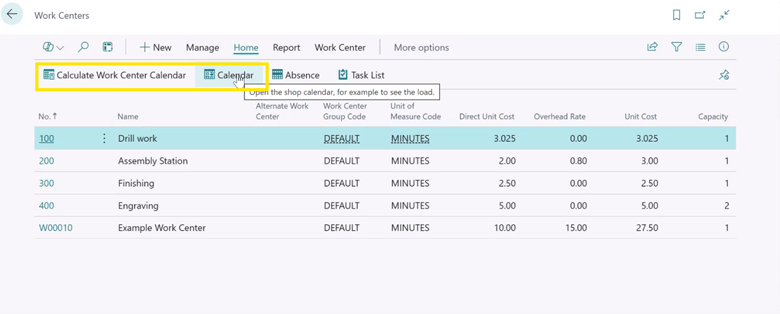
Calculate the work center and production order calendar options.
This recalculation updates the available capacity used in MRP (Material Requirements Planning) and production order scheduling. Without it, changes like increased staffing won’t be reflected in your planning. Once complete, you will be all set for another year or until you make further changes to the production center.
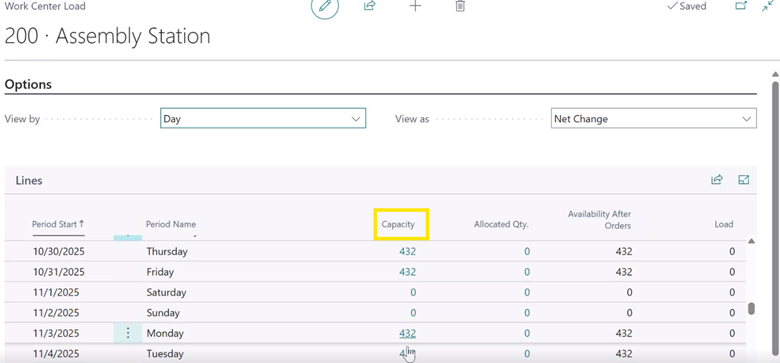
Assembly station capacity.
Best Practices and Considerations
While updating your production order calendar, ensure that you stay fast and efficient. A few best practices to consider while updating are:
Review your calendar annually, even if you have extended it far into the future. This ensures that any changes to your work center are picked up.
Update your calendar ahead of time to avoid errors and prevent disruptions.
Use the scheduler tool to automate calendar updates and reduce manual effort.
Following these best practices will help you stay efficient and avoid errors or issues with your production in Microsoft Dynamics 365 Business Central.
Updating your production order calendar plays a crucial role in ensuring your manufacturing operations run smoothly. It ensures that you remain accurate, your capacity planning is realistic, and your teams avoid frustrating errors. Whether you choose to update it annually or extend it into the future, ensure it's part of your regular production maintenance routine.