

Blog
Resources from our industry-expert staff
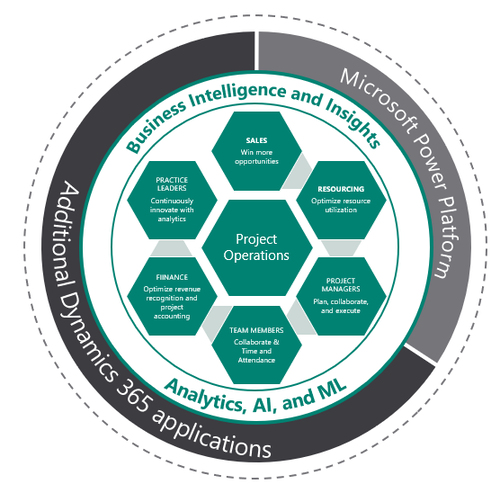
What is Dynamics 365 Project Operations?
Native cloud, Dynamics 365 Project Operations combines features from Project Online and Project Service Automation to create a comprehensive project management application that seamlessly integrates with other Dynamics 365 applications.

Marketing Lists vs. Marketing Segments in Dynamics 365 Marketing
The variety of list types can be confusing, so it’s important to understand the difference. There are two main list types: the marketing segment and the marketing list. Marketing segments are designed to be paired with customer journeys so a marketer can guide members of a selected subset of contacts through a journey of content that can include marketing emails, marketing forms & pages, events, and more.

Tracking online behavior with Dynamics 365 Marketing
Monitoring online behavior associated with a website, social media pages, and landing pages is essential for marketers. Tracking this behavior can give insight into what messaging your audience is connecting with and how they are accessing it. Dynamics 365 Marketing gives marketers the tools needed to track their audience and learn more about what content they connect with.

What are Microsoft Partner Competencies?
Companies making an evaluation for a new Microsoft partner can often be confused about a prospective partner’s qualifications or what they may offer. For many partners, they may be certified in one area or another by Microsoft. They may also have a tier of qualification on each of their certifications.

Lead Scoring with Dynamics 365 Marketing
Microsoft’s Dynamics 365 Marketing contains a comprehensive lead scoring system that helps marketers do exactly that. With an easy-to-use UI-based scoring module, it is simple to create scoring models that rank leads and automatically target them.

How often do Office 365 applications get updates?
Does it seem like your Microsoft Office apps are updating all the time, or are updates only available every few months? Read this blog to learn about Office update channels, how they differ, and why you may want to choose each specific one.

Microsoft’s October 2019 Dynamics 365 Business Central Releases
On October 1st, Microsoft released the first patch of their Wave 2 2019 Business Central updates. Business Central, the newest cloud-based ERP accounting solution offered by Microsoft, is designed to provide easy to use, high end accounting tools to small and mid-size businesses. This update features a significant amount of feature improvements and advances in migration as Microsoft prepares to align Business Central on-premises with the online version.

Microsoft’s new direction with ERP Part 3: What direction should you take?
An important consideration to make is Microsoft’s development strategy. Microsoft has reallocated its development resources away from Dynamics GP and Dynamics SL to Business Central. This means that although Microsoft continues to support GP and SL, the majority of new development is happening in Business Central.

Microsoft's new direction with ERP part 2: Where is Microsoft ERP now?
Where is Microsoft ERP right now? Walk through install base numbers and deployment options to get a firm grasp at the landscape of ERP systems in the Microsoft ecosystem.

Microsoft's new direction with ERP part 1: The history of Microsoft ERP
Big changes have been happening at Microsoft regarding its ERP applications over the past three years. This has caused a lot of confusion and uncertainty among current Microsoft ERP clients as well as organizations looking to purchase Microsoft ERP systems.

A perspective of Business Central from a former Dynamics GP user
As a long-term user of Microsoft Dynamics GP, I will admit it was daunting when we initially transitioned to Dynamics 365 Business Central. However, within a few months of working in Business Central daily, I quickly became familiar with the ins and outs of navigating the system and have come to appreciate the ease of use and flexibility that Business Central has to offer.

How to make Office files open in the desktop app by default
Take control of your Office files and documents by establishing a permanent opening location. Whether you prefer the desktop or web, the choice is now yours. Learn how its done and how to make the option available to your users.

How to use account-based marketing in Dynamics 365 Marketing
Account Based Marketing has shown it can be a high-value element of any team’s marketing initiatives. See what you can do, and how to do it, with Account Based Marketing in Dynamics 365 for Marketing.

Live events in Dynamics 365 for Marketing
Live events require significant time and resources to figure out the logistics and ultimately put on a successful event. Dynamics 365 for Marketing makes it possible for organizations of any size to organize and manage everything that goes into a live event.

Planning and Hosting Virtual Events with Dynamics 365 Marketing
Virtual events are cost-effective and can be highly valuable for any company. Dynamics 365 for Marketing simplifies the huge number of logistics and details necessary to make an event worth it. See how the comprehensive marketing solution can help manage your digital events.

What can you do with Microsoft Search in Office 365?
Microsoft Search is a new, unified search experience that works across Windows 10, Office 365 apps, and the Bing search engine. Announced in September 2018, it reached General Availability in May 2019 for all users of Office and Microsoft 365.

How to use Dynamics 365 Customer Engagement to generate leads from LinkedIn
Take advantage of the social media platform made for business by using it to capture and nurture high quality leads with the Dynamics 365 Customer Engagement integration for LinkedIn.

How Microsoft Teams and Skype for Business are coexisting
With two apps that seem to serve the same purpose, it’s hard for organizations to determine what they should do. Get a full explanation of how Microsoft Teams and Skype for Business are coexisting today, Microsoft’s plans for the future, and how you can use the apps together.

The Dynamics 365 April Release is live!
On April 5, 2019, the Dynamics 365 April release was made Generally Available to customers. Learn about upgrades made to the suite of Dynamics 365 apps, Business Central, the Microsoft Power Platform, and how they’ll all be affected. Sign up for a free 30-day trial to get started with Dynamics 365 for yourself.

How to use Microsoft Flow to automatically send a weekly email of open leads in Dynamics 365
Managing leads can feel like a failing juggling act. You keep in touch with most leads but fail to respond to a question one lead has about your proposal. Enhanced sales management applications like Dynamics 365 for Sales are great for keeping track of sales contacts, notes, and dates, but are limited by a user’s ability to complete manual sales tasks.
Subscribe to our monthly newsletter
Sign up for the latest news about training, product updates, promotions, resources, and more.